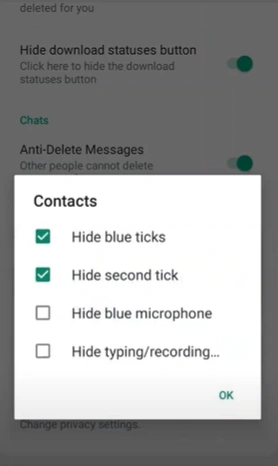
What the ticks mean
One grey tick: the message reached WhatsApp. Two grey ticks: it reached their phone. Two blue ticks: they opened the chat. Hiding blue ticks does not hide the fact that you replied, sent a voice note, or came online. People can still infer that you saw something.
Where the switch is
Open GB Settings → Privacy. Look for Hide blue ticks, Second tick, Hide seen, or Disable read receipts. Change one switch, then ask someone you trust to send you a message and tell you what they see. Do not flip every privacy toggle at once or you will not know which one did the work.
On some builds, turning receipts off also hides other people’s blue ticks from you. Read the line under the switch. If you only wanted last seen changed, leave this toggle alone and use last seen and online status settings in GB WhatsApp Pro instead.
When blue ticks still show
Groups, broadcasts, and status viewers often ignore the one-to-one switch. A voice call also shows that you are available. Test in a small group before you rely on it there.
These switches only change what your client sends. They do not remove you from backups or from WhatsApp’s own systems. What a modified app still cannot hide is part of privacy limits that remain when you use GB WhatsApp Pro.