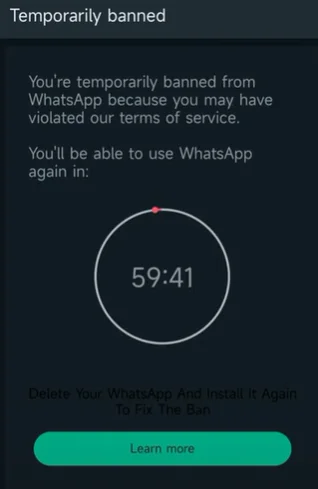
Why the limit showed up
The common cause is the client itself. GB WhatsApp Pro is not the official app, and WhatsApp can limit numbers that stay on unsupported builds. A second cause is how the number was used: lots of new chats, forwarded messages, or automated replies that look like spam.
A weak signal or a delayed SMS is not a ban. If you never got a code and there is no timer, that is a registration problem, not this page.
Match the message you see
- Screenshot the banner. Include the timer, if any, and any support link. Do this before you force-close the app.
- Check whether chats still open. A timer with read-only chats is usually temporary. A logout that demands the official app is stricter.
- Stop new login attempts. Requesting code after code can add a longer wait on top of the original limit.
When the banner says to continue only in the official app, follow what to do when GB WhatsApp asks for the official app instead of hunting another APK the same day.
What is safe to try
If a timer is counting down and you can still open Settings, leave the mod alone until it ends. Do not pay anyone who offers to “unban” the number. WhatsApp does not sell that service, and those pages often want your verification code.
If you may have to uninstall, export or back up first. Saving GB WhatsApp chats before you remove the app only works while this build still opens. A backup made after you clear data is already too late.
If the timer ends and it happens again
Repeating the same mod login after a warning often shortens the next window. Temporary limits sometimes lift. A number that keeps returning to the same screen may not. No APK on this site can restore a number WhatsApp has already limited. If the same screen returns after the timer, staying on GB WhatsApp Pro repeats the warning. It does not clear it.